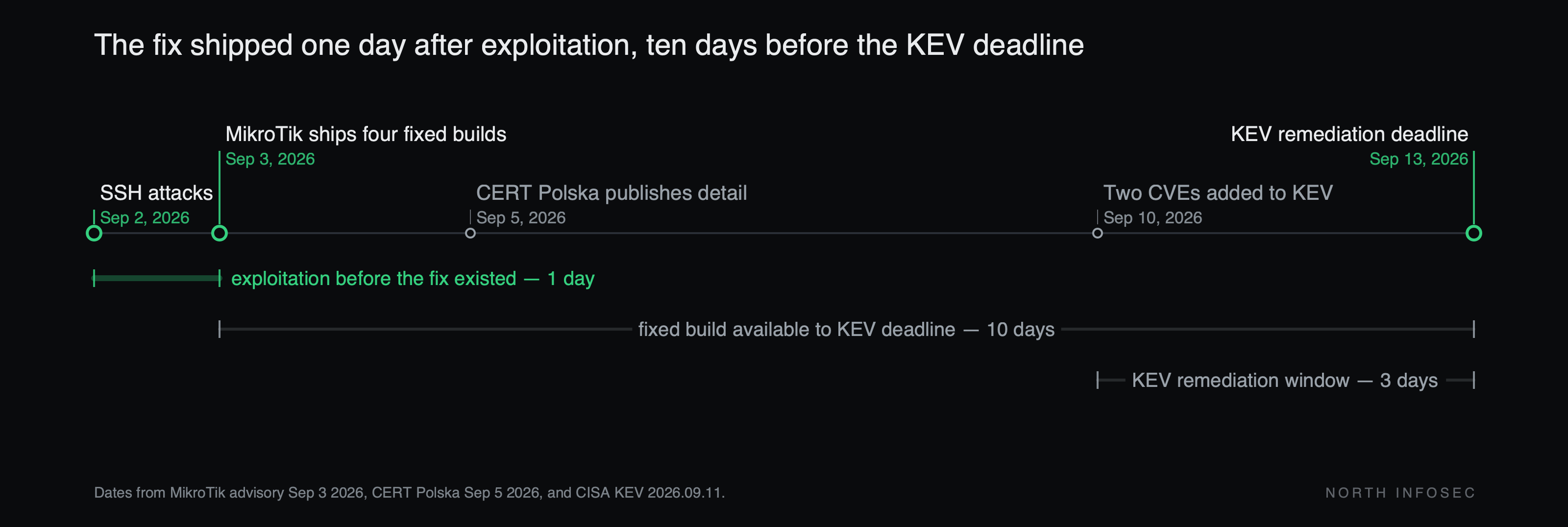
MikroTik's RouterOS advisory of September 3 opens by saying what it is not going to say: "To give time to update your systems, we are not currently publishing detailed information." It names four fixed builds — 7.25 beta 3, 7.24.2, 7.23.4 and 6.49.21 — and little else. Two days later CERT Polska published the technical detail on an accelerated schedule, because the patched packages were already public and "their comparative analysis has allowed the community to reconstruct some of the fixed bugs." By then CERT.pl had been watching attacks on internet-facing RouterOS devices since at least September 2 — a day before the fix existed. CISA added two of the CVEs to KEV on September 10, with a September 13 due date.
CERT Polska found six vulnerabilities in RouterOS. Two of them chain, over SSH, into unauthenticated control of the device: "Combining two of them allows an attacker to take full control of the device without authentication if the device supports remote access using the SSH protocol." CERT.pl named the chain MikroTrick. The attacks it observed left a specific footprint — a highly privileged user named ops, log lines reading login failure for user -2 from <ip> and user <name> added by ssh:-2@<ip>, and traffic from 82.192.72.4, with a second address, 103.102.31.18, seen attempting the same chain.
The fix and the detector are the same file
MikroTik put the compromise check inside the patch. "RouterOS will check if your device has been compromised, and set it to 'Flagged' status if it is. This will be written in the 'Log' section." CERT.pl describes the same mechanism from the outside: at startup the fixed build "scans the configuration for known signs of unauthorized changes, disables the recognized suspicious configuration entries, writes a critical message to the log, and sets a warning (the 'Flagged' marker)."
It is the inverse of a vendor shipping a fix and describing it vaguely: the write-up was withheld and a detector shipped in its place. So an unpatched router is not merely exploitable, it is unable to answer the question. Every week the maintenance window slides is a week you cannot say whether the device was already taken. The patch decision and the incident-response decision are one decision, and that changes who has to sign off on it and how fast.
The cost is the reason these windows slide: upgrading RouterOS reboots a box that sits in the traffic path, usually at a branch or a client site, usually during business hours if you want anyone on site. And one of the four named fixes, 7.25 beta 3, is a beta-channel build. If you are on the 7.25 branch, the fixed release available to you is a beta; the 7.24, 7.23 and 6.49 branches each have a stable one, and moving to a stable branch is the cleaner answer if your feature set allows it.
After the reboot, read two things rather than one:
/log print where message~"Flagged"
/system/device-mode/print
/user print
/system script print
/system scheduler print
The first two tell you what the vendor's signatures found. The rest tell you what they might have missed, and that gap is the point. CERT.pl states it directly: the mechanism "detects only selected traces left after a compromise — the absence of the marker is not proof that the device is safe," and it cannot rule out bugs the vendor did not describe in the changelog. A device that comes back un-flagged has not been cleared; it has been checked against known signs, which is a smaller claim. The manual read of users, scripts, scheduler tasks, proxies and tunnels is the part that is yours to do.
If the marker does appear, CERT.pl's instruction is to treat the device as taken over: isolate it, secure the logs and configuration first, then factory reset and rebuild from a configuration you trust rather than restoring a backup taken from that device. Rotate the passwords and keys it held, and do not clear the marker before the analysis is finished.
If the upgrade genuinely cannot happen this week, CERT.pl's interim measures are to block SSH, WWW/WWW-SSL and the bandwidth-test server from everything outside a trusted management network, and to stop initiating TLS connections or using /system ssh from the unpatched device across untrusted networks. Those reduce the attack surface. They do not tell you anything about what already happened.
What to check this week
- Every RouterOS device you own, including the ones a contractor installed and the branch box nobody has logged into since it was racked — the same inventory gap as an edge device on a cellular modem that no team claims.
- Whether SSH, WebFig or the bandwidth-test server answer from any untrusted network. MikroTik's default configuration blocks SSH from the internet; the question is which of yours were opened manually.
- The running version on each, against 7.25 beta 3, 7.24.2, 7.23.4 and 6.49.21 — and which branch each device is on, because that determines whether a stable fix exists for it.
- The log for the Flagged entry and
/system/device-mode/printfor the marker, after the upgrade and not before. - The configuration itself for a user, script, scheduler entry, proxy or tunnel you did not create — on every device, including the ones that came back clean.
North InfoSec runs AI-assisted penetration testing and security assessments, including the kind of internet-facing device review described above. northinfosec.com